
Accessing the SCT
Access the SCT from the Workspace’s SCT menu. Either load the desired SCT from a file or select the model-saved SCT from the list. You can also use the Reopen or Show menu as desired.
Figure 2.1 Workspace’s SCT menu
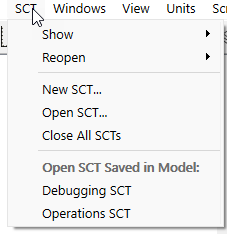
In this example, there are two SCT’s saved in the model, “Debugging SCT” and “Operations SCT”.
Also, you can open an SCT using the Quick Start window when first opening the model or using the Open SCT script action.
Finally, use the Object Shortcut Manager to create shortcuts from Object windows to open an SCT. See Object Shortcut Manager in User Interface for more information.
Related topics
Revised: 05/30/2026