
Save an SCT in the Model File
An SCT can be saved to a separate file or in the Model File. Use procedure below to save the SCT to the model file. See Save an SCT to a Separate File for information on saving the SCT to a separate file.
Use this procedure to save an SCT in the model file.
1. Use the SCT’s Config, and then General menu.
2. Select the Save in the Model File option.
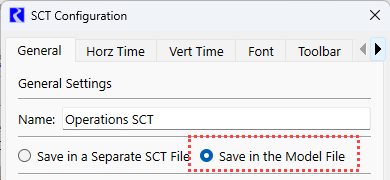
3. Specify a Name in the Name field. This name will be shown on the title bar and the Workspace SCT menu.
4. Select OK
5. Save the model from the SCT or Workspace file menu (File and then Save Model). Now the SCT is saved in the model file.
Related topics
Revised: 05/30/2026