
RiverWare Policy Language (RPL)
The following changes were made to the RiverWare Policy Language.
RPL Set Save Location
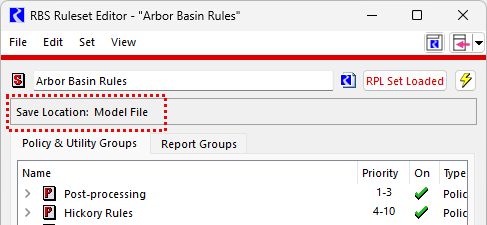
For RPL sets saved as a separate file, the path to the RPL set file was previously shown near the top of the RPL Set Editor. Now for RPL sets that are embedded in the model, the Save Location is also displayed as “Model File.”
Figure 1.13 RPL Set Editor with New Save Location Highlighted
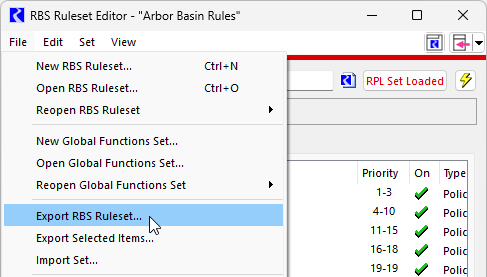
In addition, for RPL sets saved in the model, the File menu no longer includes “Save” or “Save As” options. Instead and “Export Set” operation has been added. The Export Set operation has the same behavior as Save As. It just uses different terminology. The menu is shown in the screenshot below.
Figure 1.14 RPL Set with File Export RBS Ruleset Shown
Model Information - RPL Sets Saved in the Model
See the note about the Model Info window now listing the RPL sets saved in the model: Model Information - RPL Sets Saved in the Model.
RPL Debugger - Expression Breakpoints
RPL Debugger breakpoints can now be set before or after any RPL expression in addition to the existing functionality to set breakpoints before a statement or before or after a rule or function execution. This greatly increases the flexibility for when RPL execution can be paused in the RPL Debugger. For example, a breakpoint can now be set on the expression inside a FOR loop to see how the expression evaluates on each iteration of the FOR loop.
Figure 1.15 RPL Expression shown new Expression Level Breakpoints
fig
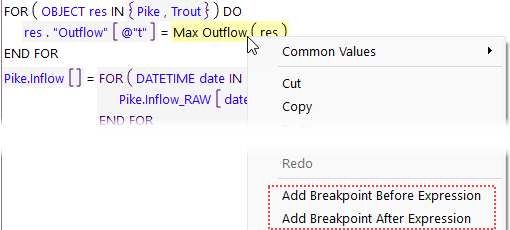
Breakpoints are added before or after an expression from a right-click menu on the expression.
Figure 1.16 RPL Context Menu showing Add Breakpoints Options
 RP
RPSee Breakpoints on RPL Expressions in Debugging and Analysis for more information.
RPL Debugger Performance Improvements
Performance was improved for the RPL Debugger by reducing computation overhead when the RPL Debugger is enabled. For some rulebased simulations with RPL Debugging enabled, this resulted in a 10% decrease in run times.
RPL Viewer - Clear Viewer Operation
The RPL Viewer now supports a Clear Viewer operation (File and then Clear Viewer) to remove all items from the viewer. This can be useful if trying to add an empty RPL Viewer to a Window Layout (Window Layouts in User Interface) or Multi-Window (Multi-Windows in User Interface).
See Closing a RPL Editor Tab in RiverWare Policy Language (RPL) for more information.
Revised: 12/01/2025