
Workspace SCT Menu
To access the SCT, select SCT on the RiverWare workspace.
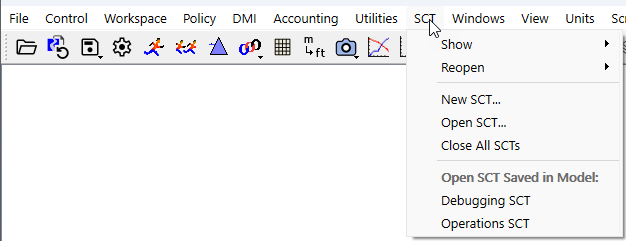
Show
Bring an open SCT to the front.
Reopen
Reopen a recently accessed SCT file. Up to six SCT files are remembered from one RiverWare session to the next. Provides quick access to all recently opened SCTs.
Currently open SCTs are excluded from this list and appear in the Show menu instead.
New SCT
Create an empty SCT in a new SCT window.
Open SCT
Open an existing SCT file in a separate SCT window. Use the File Chooser to select the SCT.
Close All SCTs
Close all open SCTs without saving them. A confirmation message is displayed for each one, preventing you from inadvertently closing an SCT without saving it first.
Open SCT Saved in Model:
When SCTs are saved in the model file, each SCT is listed in this menu. This provides quick access to these SCTs. See Save an SCT in the Model File for more information on saving in the model file.
Revised: 05/30/2026