
Multiple Run Management
The following changes were made to Multiple Run Management.
MRM Configuration Window Reorganized
The Policy and Input components of the MRM Configuration window have been reorganized to make them more intuitive. No changes are required for existing models.
The following changes were made.
• The selection of the policy type, input DMIs, and input mode have been moved out of the top portion of the MRM configuration.
• The Mode specification is now to the right of the Name field at the top of the Configuration window.
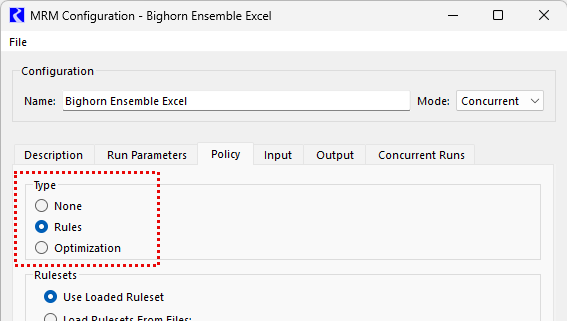
• The policy type specification has been moved to the Policy tab (see Figure 1.1). The Policy tab is now always visible for Concurrent and Consecutive modes. (The Policy tab is never visible for Iterative mode, which is the same as previous behavior.)
Figure 1.1 MRM Configuration Policy tab showing the new location of the policy type specification
• The Input tab is now always visible for Concurrent mode and never visible for Consecutive or Iterative mode.
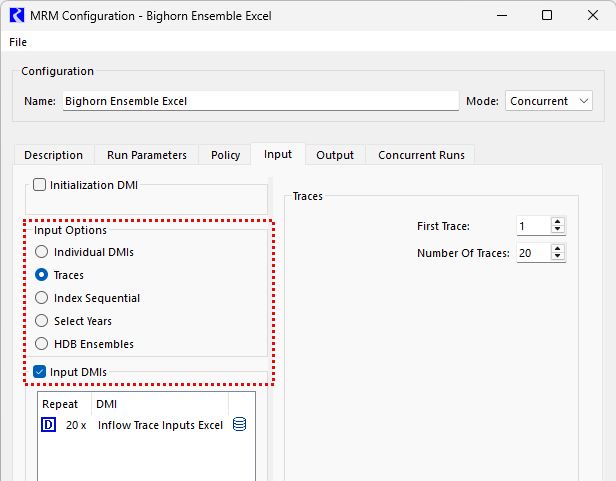
• The Input Options are now located on the left side of the Input tab, between the Initialization DMI specification and Input DMIs (see Figure 1.2). The contents of the right panel of the Input tab is now always specific to the selected Input Option.
• The specification of whether to use Input DMIs is now a checkbox at the top of the Input DMIs panel (see Figure 1.2). De-selecting the checkbox will deactivate the Input DMIs panel.
• The Input Option previously called “None” is now called “Individual DMIs” to more accurately represent its functionality.
• The HDB Ensembles option is now located together with the other Input Options rather than being a separate checkbox below the Input DMIs. If HDB Ensembles is selected for the Input Option, the specification of the Input DMIs and Output DMIs, previously on the Ensembles tab, is now in the right panel of the Input tab. There is no longer a separate Ensembles tab.
• The Index Sequential/DMI Mode (Combinations or Pairs) specification has been moved to the right panel of the Input tab, displayed only when Index Sequential is selected as the Input Option. It is no longer always shown at the bottom of the Input tab.
Figure 1.2 Screenshot of the MRM Configuration Input tab showing the new location of the Input Options
See Configuring a Multiple Run in Solution Approaches for more information on the MRM Configuration window.
Improved Diagnostics for Failed Distributed MRM
Previously, if a Distributed MRM run was initiated from a RCL batch script or a RiverWare script in the model, and if the MRM failed, the only diagnostic message returned was that the MRM finished unsuccessfully. Now additional diagnostics state which traces failed and provide the path to the log files for the distributed RiverWare processes in which the failures occurred, which provide more detailed diagnostics about the failure. The new messages are printed to the Diagnostics window for a Distributed MRM initiated from a script started from the RiverWare user interface. For a batch run, these new messages are printed to the specified log file for the batch run command.
This improvement addresses issue RW-7270.
See Distributed Concurrent Runs in Solution Approaches for more information on Distributed MRM.
Revised: 05/31/2026