
Slots
The following changes have been made to RiverWare slots.
Expression Slots in Script Actions
See the important note: Expression Slots in Script Actions.
Search Slots - Find Series Slots with Flags
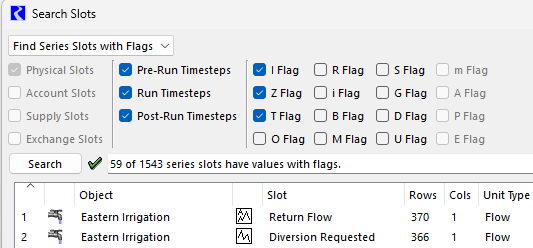
The Search Slots tool was enhanced to find slots with any selected flag. Previously the tool was limited to finding slots with inputs (I, Z, or T flag). You can now specify any set of flags for the search. The tool is accessed from the Workspace, then Slots, then Find Flags menu. (Previously the menu item was Find Inputs.)
In addition, the controls for specifying the timesteps considered by a search were expanded to include three periods relative to the run: Pre-Run Timesteps, Run Timesteps, and Post-Run Timesteps. Previously it was limited to specifying Initialization Timesteps and Run Timesteps. See the following screenshot.
Figure 1.17 Search Slots with Various Flag and Timestep Filters
See Finding Flags on Series Slots in User Interface for more information.
Synchronize Scrolling Setting
On the Settings Manager Slot Display page, the label was updated for the setting “Synchronize Series Slot on Startup” to reflect the behavior of the setting. Previously the label was “Synchronize Scrolling on Model Load.” The behavior of the setting did not change. The new label reflects the behavior, which is to control default scrolling behavior when starting a new RiverWare session, not when opening a new model, as the old label suggested. This addresses the issue filed as RW-7206.
Figure 1.18 Settings Manager with Slot Display Options

Revised: 12/01/2025