
Data Management Interface (DMI)
The following changes have been made to RiverWare DMI functionality.
Copy and Paste Operations
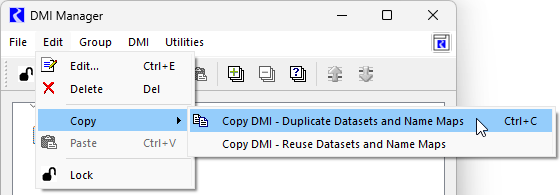
In the DMI Manager, the copy and paste operations on the Edit menu and right-click shortcut menu were revised for simplicity and clarity and are now dependent on the type of DMI.
For Control File - Executable DMIs and Trace Directory DMIs, a single Copy operation is available. This is a standard copy operation, and only the DMI is copied. This operation can also be performed using the Ctrl + C keystroke combination. Previously additional copy operations were displayed in the menu but were disabled.
For Database DMIs, there are now two options.
• Copy DMI - Duplicate Datasets and Name Maps. This operation provides a “deep copy” of the Database DMI and all referenced Datasets and Name Maps accessed. When pasted, the new Database DMI is connected to the newly duplicated Datasets and similarly, Name Maps.
• Copy DMI - Reuse Datasets and Name Maps. For Database DMIs, this is a “shallow” copy of the Database DMI only. None of the accessed Datasets or Name Maps are duplicated, only the Database DMI itself. When pasted, the new Database DMI refers to the original Datasets and Name Maps, that is, they are reused.
For Database DMIs, the Ctrl + C keystroke combination corresponds to the first option, which duplicates the Datasets and Name Maps. Previously it was unclear which type of copy was performed for the Ctrl + C shortcut.
See Copy and Paste DMIs in Data Management Interface (DMI) for more information.
Figure 1.5 DMI Manager with New Copy DMI Operations
CDSS Web Service DMI
See the important note: CDSS Web Service DMI - Off by One Timestep
DSS and CDA Web Service Dataset
The USACE DSS database and CWMS Data API (CDA) web service both support pseudo-regular time series. Pseudo-regular data is typically stored in the database in UTC but represents a measurement taken at the same local time each day, regardless of whether daylight saving time is in effect. For example a value might be stored on Oct 02, 2023 at 05:00 UTC but represents Oct 01, 2023, 24:00 Central Time. Pseudo-regular time series are identified by a “~” in the DSS E-Part or the CDA name.
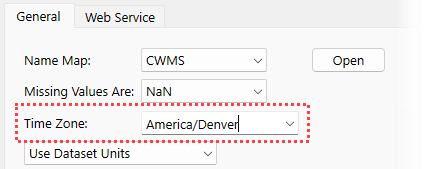
Now, both the DSS and CDA web service datasets support pseudo-regular time series. For this type of data, the Time Zone must be specified in the configuration. The time zone is only required for pseudo-regular time series.
See the following for more information:
Figure 1.6 Dataset with Time Zone Controls
CWMS Data API Web Service - Office
See the important note CWMS Data API Web Service - Office Now Required.
CWMS Data API Web Service - Pagination
The CWMS Data API (CDA) web service was recently migrated from Version 1 to Version 2. As a result, the CDA web service now supports pagination where a large query is decomposed into multiple smaller queries. There is no change necessary for existing models. However, the reading of data and the diagnostics may be different for long queries. See Other Information in Data Management Interface (DMI) for details.
USGS Daily Values Web Service Updates
See the important note USGS Daily Values Web Service DMI Updates.
Revised: 12/01/2025