
Slots
The following changes have been made to RiverWare slots.
Aggregate Series and Table Series Slot Notation
All references to “AggSeries” and “TableSeries” slots in the user interface were changed to “Aggregate Series” and “Table Series,” including the default name for a new custom aggregate series slot. This makes the notation consistent with other slot types and addresses issue RW-7287.
Interpolate Across Slots
The Series Slot Viewer and Aggregate Series Slot now provide the ability to interpolate between values in a selected row with a new Interpolate Across option from the Edit menu. The existing Interpolate option has been renamed to Interpolate Down for clarity.
Figure 1.15 Interpolate Across Option
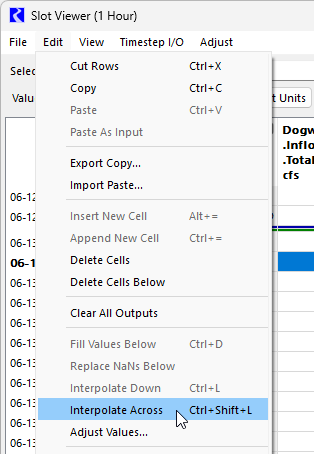
See Edit Menu in User Interface for more information on the Interpolate options.
Slot Convergence Units Display
Previously when using the Configure Existing Slots window to set slot convergence for multiple slots, if the Absolute convergence option was used, the display incorrectly showed the user display units from the active unit scheme while the numeric value was actually in internal units. Now the correct internal units are displayed. This addresses issue RW-6369. This change does not affect the underlying convergence value and thus, does not change model results. It only changes the unit label displayed. The Slot Configuration window for an individual slot already correctly showed internal units when using Absolute Convergence.
See Global Slot Configuration in User Interface for more information on the Configure Existing Slots window.
Revised: 05/31/2026